


Starlink Power Supply Setup: Complete Guide for Starlink Mini, RV, and Off-Grid Users
A steady power setup ensures your Starlink remains operational wherever you are. From RV trips to off-grid cabins, this guide shows how to configure Starlink Mini power, adapters, and batteries for reliable connection and safe operation.
Understanding Starlink Power Requirements
Starlink Power Ratings and Voltage Compatibility
Starlink devices operate on specific power levels depending on the model.
- Starlink Mini: Typically consumes around 20–40W, optimized for portable and off-grid setups.
- Starlink Gen 2 and Gen 3: Require higher power, ranging between 50–75W, with startup spikes up to 100W.
- Voltage Input: Although Starlink uses DC internally, most adapters convert the power from AC to DC. Users in mobile or RV setups often rely on 12V or 24V DC-to-DC conversion.

For RV and off-grid Starlink users, understanding these values is crucial to avoid voltage mismatch or underpowered configurations.
Why Proper Power Configuration Matters
Improper power setup can cause system instability or permanent damage to the device. Reliable voltage ensures:
- No voltage drop or intermittent disconnection during use.
- Extended device lifespan with stable and efficient DC input.
- Prevention of "Starlink won't power on" errors is often caused by incorrect voltage or incompatible cables.
Essential Components for a Stable Starlink Power Setup
Starlink Mini 12V DC Power Cable – Setup & RV Usage
This cable is ideal for Starlink RV and vehicle setups, allowing direct connection to a 12V socket.
- Plug-and-play design for convenient on-the-go installation.
- Reverse polarity protection to prevent short circuits.
- Compatible with Starlink Mini 12V power setups for road trips or mobile workstations.
Starlink V2/V3 Voltage Converter Module – 12V/24V Setup
Designed for vehicles, boats, or solar power systems, the voltage converter ensures proper power delivery.
- Input: 12V/24V DC → Output: stable 48V DC.
- Required for off-grid Starlink power supply configuration.
- Prevents overvoltage and ensures consistent data connectivity during travel.

USB-C to DC Power Cable – Starlink Mini USB-C Power Setup for Camping
Ideal for minimal setups using portable power banks or solar generators.
- Works with USB-C PD 65W+ outputs.
- Enables Starlink Mini USB-C power setup for camping and outdoor use.
- Compact, lightweight, and easy to carry for travelers.
Heavy-Duty 16AWG DC Extension Cable – Long-Distance Power Configuration
A must-have for installations where the Starlink dish is far from the power source.
- Built with 16AWG thick copper wire to minimize voltage loss.
- Waterproof and weather-resistant connectors for outdoor setups.
- Suitable for Starlink long-distance power configurations.
150W AC Adapter – Starlink Home Power Adapter Setup
Perfect for standard home or office environments.
- Converts 110–240V AC to a stable DC output.
- Features include surge protection and auto voltage regulation.
- Recommended for Starlink Mini and Gen 3 home power setups.
How to Connect and Configure Your Starlink Power Setup
Step-by-Step Starlink Power Connection Guide
- Identify your power source: Choose between AC, 12V DC, or USB-C PD based on your setup.
- Select compatible accessories: Use a certified Starlink DC cable or voltage converter for 12V/24V systems.
- Check voltage output: Ensure consistent 12V or 24V DC power, depending on your model.
- Connect components: Link your power source → converter → DC cable → Starlink dish input.
- Verify operation: Check LED indicators and confirm a stable connection in the Starlink app.
Safety Tips for Starlink Power Configuration
- Always use Starlink-certified cables and converters to prevent overheating or damage.
- For outdoor setups, ensure all connectors are waterproof and dustproof.
- Avoid using low-wattage USB-C PD banks (under 65W).
- Regularly inspect cables for signs of wear, corrosion, or loose joints.
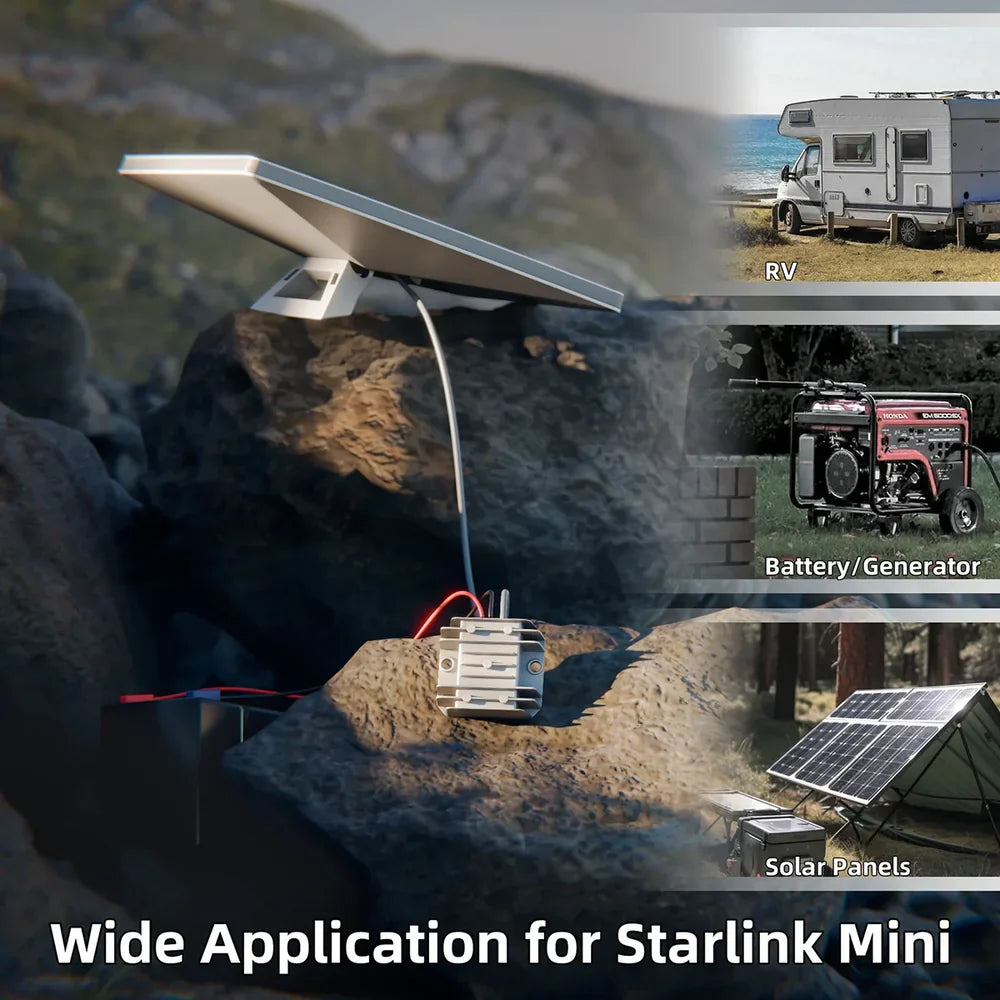
Starlink Power Supply Recommendations by Scenario
| Usage Scenario | Recommended Combination |
|---|---|
| RV / Vehicle Setup | 12V DC Cable + Voltage Converter |
| Camping / Off-Grid | USB-C to DC Cable + PD Power Bank |
| Home / Office | 150W AC Adapter + DC Cable |
| Extended Installation | 16AWG Extension Cable + Converter |
Each setup combination ensures stable connectivity and adapts to various environments, from mobile living to stationary installations.
Troubleshooting Common Starlink Power Issues
Why Won't Starlink Power On with 12V DC?
This issue often occurs when the power converter isn't outputting the required 48V DC or when cable polarity is reversed. Double-check your converter's specifications and wiring direction before reconnecting.
How to Fix Starlink Power Voltage Drop
Voltage drop happens when cables are too long or too thin. Replace low-gauge wires with 16 AWG or thicker cables and minimize the extension length.
Why Does My Starlink Keep Disconnecting Off-Grid?
Frequent disconnections may indicate unstable power input.
- Ensure the power bank or inverter provides a consistent output of 65W or higher.
- Keep converters ventilated to prevent overheating.
- Avoid sharing the same circuit with heavy electrical loads.
Starlink Power Setup FAQ
1. Can Starlink Mini run on 24V DC?
Yes, with a proper voltage converter that delivers a stable 48V DC output.
2. How long can Starlink run on a 65W power bank?
On average, Starlink Mini can operate for 2–3 hours, depending on network activity and temperature.
3. Can Starlink be powered directly from a car battery?
Yes, but only through a regulated converter between the 12V battery and the Starlink input.
4. Why does my Starlink power adapter get hot?
Overload or inefficient power conversion—always use certified adapters with proper ventilation.
5. What's the safest power setup for RV users?
Use a 12V DC cable with a voltage converter module, ensuring waterproof and shockproof installation.
Maintenance and Best Practices
- Regularly clean connectors and inspect them for signs of oxidation or moisture.
- Avoid bending or stretching cables sharply.
- Store components in a dry, cool place when not in use.
- Keep a backup adapter or converter for emergencies during travel.
- Use heat-resistant cable sleeves for outdoor setups in hot climates.

Conclusion
A properly configured Starlink Power Supply Setup ensures stable internet connectivity, hardware safety, and long-term reliability. Whether powering your Starlink Mini from a home socket, vehicle battery, or portable solar system, using high-quality cables, certified converters, and verified adapters makes all the difference.
From Starlink Mini 12V setups for RV travelers to USB-C PD configurations for outdoor explorers, choosing the right power solution guarantees seamless operation—anywhere, anytime.